

 読み込み中...
概要
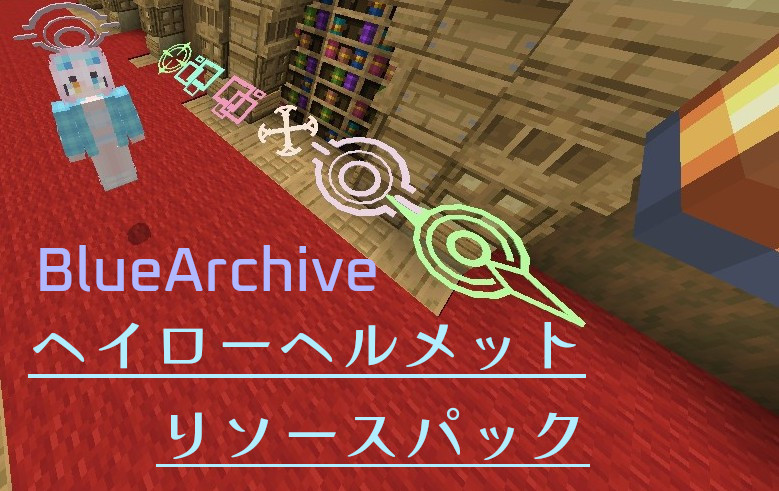
- ヘルメットをかぶったときブルーアーカイブのヘイローをつけることができます。
- リソパの設定からヘルメットを表示するか選べます。
- ヘルメットをつけた時のアニメーションもあります。
デフォルト設定
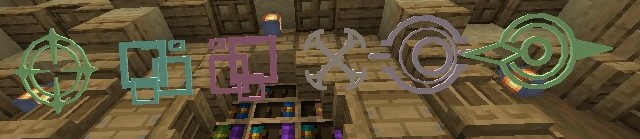
革:ユズ
銅:ミドリ
金:セイア
チェーン:アリス
鉄:ケイ
ダイヤ:ホシノ
ネザライト:ヒカリ
になっています
ヘイロー変更と改造について
改造は自由にしてもらって大丈夫です。
ヘイローはattachablesのファイルをいじれば変更できます。
(ヘルメットの見た目を変更するにはtextures/haloから変える必要があります)
例えばチェーンヘルメットを変えるときは
attachables/chainmail_helmet.json>>>
{
“format_version”: “1.8.0”,
“minecraft:attachable”: {
“description”: {
“identifier”: “minecraft:chainmail_helmet”,
“materials”: {
“default”: “armor”,
“enchanted”: “armor_enchanted”
},
“textures”: {
“default”: “textures/halos/al1s“,
“enchanted”: “textures/misc/enchanted_actor_glint”
},
“geometry”: {
“default”: “geometry.al1s“
},
“scripts”: {
“parent_setup”: “variable.helmet_layer_visible = 0.0;”
},
“render_controllers”: [ “controller.render.armor” ]
}
}
}
attachables/chainmail_helmet.player.json>>>
{
“format_version”: “1.10.0”,
“minecraft:attachable”: {
“description”: {
“identifier”: “minecraft:chainmail_helmet.player”,
“item”: { “minecraft:chainmail_helmet”: “query.owner_identifier == ‘minecraft:player'” },
“materials”: {
“default”: “armor”,
“enchanted”: “armor_enchanted”
},
“textures”: {
“default”: “textures/halos/al1s“,
“enchanted”: “textures/misc/enchanted_actor_glint”
},
“geometry”: {
“default”: “geometry.al1s“
},
“scripts”: {
“parent_setup”: “variable.helmet_layer_visible = 0.0;”,
“animate”: [
“halo_controller”
]
},
“animations”: {
“active_al1s“: “animation.halo.active.al1s“,
“armor_halo”: “animation.player.armor.halo”,
“halo_controller”: “controller.animation.al1s“
},
“render_controllers”: [ “controller.render.armor” ]
}
}
}
変更するID
アリス : alis
ケイ : kei
ミドリ : midori
モモイ : midori (geometry.midori)(animations:midori)
ホシノ : hoshino
シロコ : shiroko
シロコ*テラー : shiroko-terror
セイア : seia
ウイ : ui
イロハ : iroha
イブキ : ibuki
ヒカリ : hikari
ノゾミ : nozomi (textures/halos/hikari)(animations:hikari)
ナグサ : nagusa
()で示されているidはそっちのidにしてください(同じgeoとかなので…)
現在 この14種類ですがリクエストなどで追加予定です。
その他/注意事項
※革の防具に染色しても色が変わらなくなります。
自作発言禁止
宣伝は歓迎です
ミスやバグがあればコメントにどぞ
語彙力なくてごめんなさい(´・ω・`)
変更/アップデート
- 26/06/23 Ver.1.1
デフォルトで革装備のヘイローを実装。
ユズ、イロハ、イブキ、ウイの4つのヘイロー追加。
ノゾミがmozomiになっていたのを修正。
- 26/06/23 Ver.1.2
シロコ、シロコ*テラー、ナグサの3つのヘイローを追加。
セイアのアニメーションを修正し、ケイのアニメーションを追加しました。
- 26/07/28 Ver.1.2.1
シロコ*テラーのスペルを修正。

コメント
アニメーションまで凝っててすごい…
リクエストってしてもいいんですかね…?
イイですよ(〃ω〃)
ユズとイロハイブキをリクエストしたいです!
作ってみます!∠(`・ω・´)
ありがとうございます!
更新しました!
ありがとうございます!
何度も申し訳ないんですけど
スマホで指定の通りにいじるとリソースパックが上手くダウンロードできないんですけど
pcじゃないと無理とかありますかね…?
重複したパックを検出と出ているなら。
ストレージから一回リソパを削除するか、manifest.jsonのuuidを変える必要があると思います。
ストレージからリソパを削除してからもう一回インポートしたらたぶんできると思います。
出来なかったらまたコメントをしていただければokです。
自分で編集したmcpackファイルを開くと自動でマイクラは開かれるんですけど
画面上の通知もリソースパックも何もないんですよね…
自分でやったらできたのでおそらく多分できます。
バグって通知が出ないことがあるのかも(?)
通知が出てなくてもストレージから一回削除してからインポートしてそれでもできなければまたどうぞ。(お手数をおかけしてしまいスミマセン)
何とか適応できたんですけど
イロハのヘイローをネザライトに適用したんですけど
何故か金のヘルメットを被っちゃうようになっちゃいました…
本当にごめんなさい(_ _;)
防具の見た目も変更するならtexturesから画像を編集しないといけないです。
ヘルメットを表示しない設定ならそのままいけます。
できたら簡単に変更できるように改良します。
もしよろしければナグサとシロコテラーのヘイローを追加して欲しいです
作ってみます
ありがとうございます!
更新しました!
ありがとうございます!今後のマイクラ生活に愛用させていただきます!これからも頑張ってください!
zipファイルの方をダウンロードし、”attachables”の中にあるヘイローのidは変えれたんですけど、リソースパックのダウンロードの仕方がよく分からずに手こずってる状況なんですけど、ダウンロードってどうやればいいですか?
拡張子を.zipから.mcpackに変更して開けばできます。詳しいやり方は調べたほうが詳しいと思います。
おっふこれでブル明かす金にすればもっと完璧になるなぁ
できればツルギのもほしいなぁ
もしよろしければ飛鳥馬トキとリオのヘイローも追加して欲しいです。
すみません。テスト期間などで更新できていませんでしたが、順に更新していきます。m(_ _)m
コメント失礼します…
シロコテラー以外のヘイローを試すことができたのですが、私がなにか間違えているのかシロコテラーだけうまくいかなくて…
お手数ですが、ご確認お願いします…
一箇所スペルを間違えてました。すみません。
subpacks / default / models / entity / halos.json の3348行目の
geometry.siroko-terrorをgeometry.shiroko-terrorにするか、更新したので再DLしていただければ大丈夫です。
すいません先にディフォルトのこのパックをタブレットでダウンロードしてインポートしてからヘイローのIDを変更してパックをインポートしたんですけど重複したパックがあるって出たんですけどどうしたらいいですか?
ストレージからこのリソパを一回削除してからインポートすれば出来ます。
サーバーなどでアニメーションが有効化されません。
ワカモとハルカのヘイローを追加して欲しいです。